Inventory Pro Barcoding
Barcoding is supported in Inventory Pro Desktop and Mobile right out of the box. Simply connect a generic bar code scanner to your device or use your camera.
Our mobile offerings are specifically designed around scanners for faster processing and accuracy.
Code 128
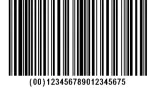
The standard format for Inventory Pro and many applications. Generic and simple for alphanumeric data.
Universal Product Codes (UPC)
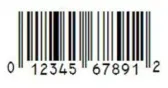
Can be found on nearly every retail product. Used for standardized inventory tracking at point of sale.
PDF417
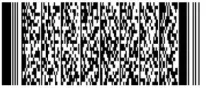
Many forms of identification use this format. It supports error correction however it is generally much larger than other 2d formats.
Quick Response (QR) Codes

QR Codes are common in marketing. But the density can be useful as multiple data points are gathered in a single scan.
Other Formats

RFID, Datamatrix, EAN, and other formats can work with Inventory Pro as well.
Code 39
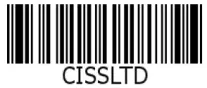
A block legacy format, Limited character set. It is still used for things such as engraving serial numbers.
Camera Scanning - No Hardware Required
Any smartphone or tablet camera works as a barcode scanner. Staff open the mobile interface, point their camera at a barcode, and the system decodes it instantly — it runs in the browser, with no app store download.
A new warehouse employee can start scanning within minutes of receiving login credentials. Organizations that previously spent thousands on dedicated scanning hardware can deploy to existing phones and tablets instead.
InventoryPro reads every standard barcode format without additional configuration — 1D codes like Code 128, UPC, and EAN, 2D formats including DataMatrix and PDF417, and QR codes. RFID tags are supported via dedicated RFID readers. Need to generate labels? Our barcode generator creates printable labels for items, bins, and locations in any supported format.
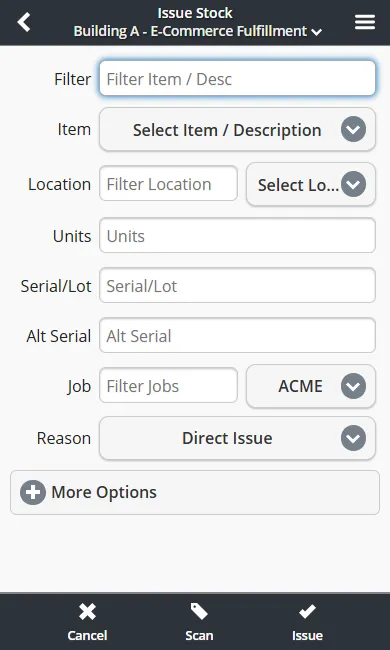
Every Transaction, Scannable
Barcode scanning is not limited to receiving. Every inventory transaction in InventoryPro supports scan-to-action: issues, receives, moves, cycle counts, shipping orders, and work order material picks. Scan the item, scan the location, confirm the quantity — the same workflow whether you are using a phone camera or a Zebra ring scanner.
Issue Stock
Scan items off the shelf for shipments, work orders, or direct adjustments.
Receive Stock
Scan against POs or blind-receive. System validates item and quantity against expected deliveries.
Move and Count
Scan source and destination locations for moves. Scan items during cycle counts.
How We Compare
vs. Dedicated WMS Hardware Systems
Traditional WMS platforms require proprietary devices costing thousands of dollars each. InventoryPro works on existing phones and tablets, with optional dedicated scanner support for high-throughput lanes. No hardware lock-in.
vs. Free Barcode Scanning Apps
Free scanning apps read barcodes but do not connect to your inventory data. InventoryPro scanning is built into every transaction - scan an item and the system knows the stock level, location, serial number, and open orders instantly.
Systems
Barcoding starts with a system, A process flow from how your labels are generated for inventory, how stock operations are processed, and it is packaged and shipped.
In some cases you may receive items already labeled from your suppliers, in others, you may need to break down pallets and label for individual sale.
We can help identify a process flow and establish methods for barcoding the key inventory attributes.
Use Cases
- Shelf / Rack labels
- Inbound Receiving
- Pick / Pack Lists, Shipping Documents
- Asset tags
- Serial / Lot numbers
- A variety of other documents
- Inventory Catalog
— Labels
Printing
On-demand and automatic label printing for stock, pick lists, and more.
On-Demand printing allows for users to pick and choose what labels to print and what situations to print them. Be it a stock receive, pick list, or otherwise.
Automatic printing allows for barcodes to be printed automatically for performing tasks throughout the system. Be it cycle counts, receiving, picking, packing.
See our Supported Printers page for supported models, from compact desktop units to industrial printers for 24/7 operations.
— Hardware
Scanners
From compact USB and camera scanning to rugged dedicated devices and Bluetooth.
For specific model information, see our Supported Scanners page - enterprise scanners from Zebra, Honeywell, and Datalogic.
USB Wired
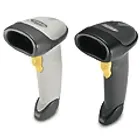
Desktop Scanners, A classic tried and true scanner. Very cheap and fast however limited by the cord length.
Camera Scanning
On the go capability, Low Volume, Built-in to Inventory Pro Mobile. Not supported on all devices.
Dedicated Scanners
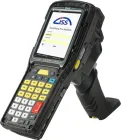
Android devices with built-in scanning hardware in a rugged chassis. High-volume capabilities.
USB Wireless
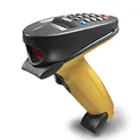
Desktop / Tablet Scanners. Commonly seen at checkout counters for large items. Fast and reliable.
Hardware Sleds
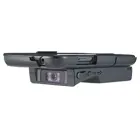
Specialized cases for phones or tablets with scanners. Commonly used on forklifts, medium-volume operations.
Bluetooth
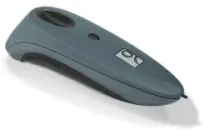
Commonly used for medium-volume operations looking to operate with readily available hardware.
Manage Inventory Professionally.
Learn more about Inventory Pro and our capabilities. From small business to industrial warehousing, our software can scale and adapt to various industries.