Barcode Scanning for Inventory Management
Scan 1D, 2D, QR, and RFID from any mobile device or dedicated scanner. Camera scanning built in - no special equipment to buy.
Multi-Format Barcode Support
InventoryPro reads every standard barcode format without additional configuration. 1D codes like Code 128, UPC, and EAN work alongside 2D formats including DataMatrix and PDF417. QR codes and RFID tags are supported for organizations that use them for asset tracking or location identification.
Need to generate labels? Our barcode generator creates printable labels for items, bins, and locations in any supported format.
Camera Scanning - No Hardware Required
Any smartphone or tablet camera works as a barcode scanner. Staff open the mobile interface, point their camera at a barcode, and the system decodes it instantly. No app store download for the scanner itself - it runs in the browser.
This means a new warehouse employee can start scanning within minutes of receiving login credentials. Organizations that previously spent thousands on dedicated scanning hardware can deploy to existing phones and tablets instead.
Dedicated Hardware Support
For high-volume warehouses where speed matters, dedicated Bluetooth and USB scanners from Zebra, Honeywell, and similar manufacturers integrate natively. The scanner sends keystrokes to the active field - no driver installation or middleware needed.
- Bluetooth ring scanners for hands-free picking
- USB wired scanners at receiving stations
- Ruggedized mobile computers (Zebra TC series, etc.)
Every Transaction, Scannable
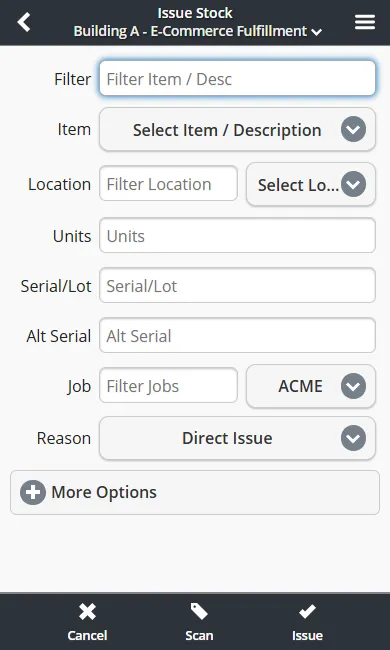
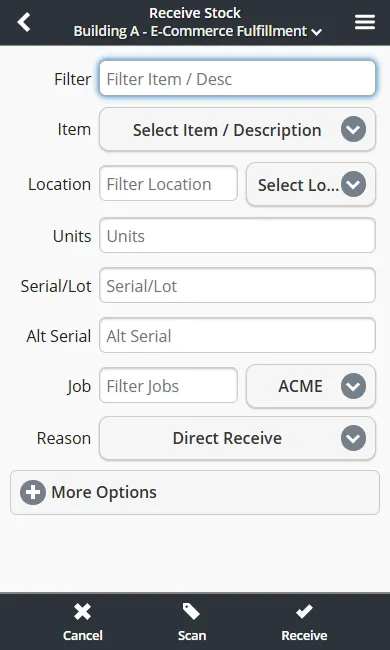
Barcode scanning is not limited to receiving. Every inventory transaction in InventoryPro supports scan-to-action: issues, receives, moves, cycle counts, shipping orders, and work order material picks. Scan the item, scan the location, confirm the quantity. The same workflow applies whether you are using a phone camera or a Zebra ring scanner.
Issue Stock
Scan items off the shelf for shipments, work orders, or direct adjustments.
Receive Stock
Scan against POs or blind-receive. System validates item and quantity against expected deliveries.
Move and Count
Scan source and destination locations for moves. Scan items during cycle counts.
How We Compare
vs. Dedicated WMS Hardware Systems
Traditional WMS platforms require proprietary devices costing $1,500+ each. InventoryPro works on existing phones and tablets, with optional dedicated scanner support for high-throughput lanes. No hardware lock-in.
vs. Free Barcode Scanning Apps
Free scanning apps read barcodes but do not connect to your inventory data. InventoryPro scanning is built into every transaction - scan an item and the system knows the stock level, location, serial number, and open orders instantly.
See Barcode Scanning in Action
Our team will walk through the scanning workflow on your own devices and show you how it fits into your existing warehouse processes.