Import and Export Inventory Data
Bring data in from CSV or Excel. Export any grid or report with one click. No manual re-entry, no copy-paste errors.
Flexible Import from CSV and Excel
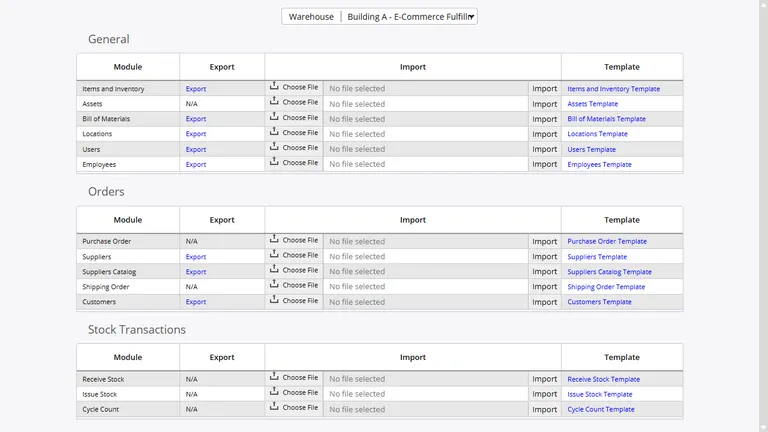
Import items, suppliers, customers, purchase orders, and stock levels from CSV or Excel files. The field mapping wizard shows your column headers alongside InventoryPro fields and handles alignment automatically. Override any mapping manually when your source file uses non-standard column names.
- CSV and Excel (.xls, .xlsx) supported
- Auto-mapping with manual override
- Validation report before committing changes
One-Click Export
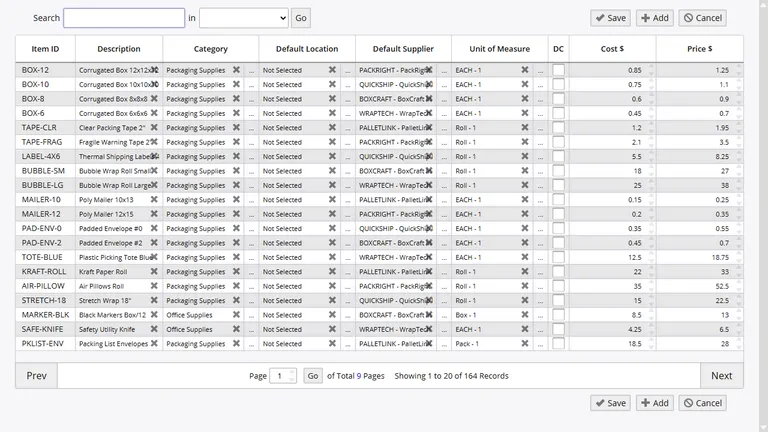
Every grid and report in InventoryPro exports to CSV or Excel with a single click. Apply your filters, sort the data how you need it, then export exactly what is on screen. The exported file matches your current view - same columns, same sort order, same filter criteria.
This works across all 260+ built-in reports, custom reports, and any data grid in the system. Warehouse staff pull their own data without waiting for IT to run a query.
Need programmatic access instead of manual exports? The REST API exposes the same data for automated reporting and integration with external systems.
Bulk Operations via Spreadsheet
Update thousands of items at once by exporting, editing in Excel, and re-importing. Price changes, category reassignments, min/max threshold updates, location moves - all handled through the same import process with validation and rollback if errors are detected.
- Batch price updates across item categories
- Mass category and location reassignment
- Progress tracking for large batch jobs
Supplier Catalog Import
Import supplier price lists and product catalogs directly into InventoryPro. The system auto-matches incoming records to existing items by SKU or supplier part number. New items can be flagged for review before they are added to your master item list.
When suppliers send updated pricing, import the new file and the system highlights what changed - price increases, discontinued items, new products - so procurement staff can act on the differences without comparing spreadsheets manually.
How We Compare
vs. Manual Data Entry
Typing items one at a time is slow and error-prone. A 5,000-row import that would take days of manual entry completes in minutes with full validation.
vs. API-Only Import Systems
Some platforms require custom API development for any bulk data loading. InventoryPro gives warehouse and procurement staff a spreadsheet-based workflow they already know, with API access available when automation is needed.
Stop Re-Keying Data Into Your Inventory System
We will review your current data sources and show you how to bring them into InventoryPro without manual transcription.